repocompare
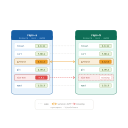
Compare Debian package lists between two APT repositories
console applicationSystemPackageManagerInstalace
apt install repocomparePopis
repocompare is a small CLI tool to compare package names and versions between two APT repositories. Useful for auditing and repository synchronisation verification.
It outputs a summary and a JSON payload describing missing and differing packages, with optional coloured output when the rich library is available.

repocompare
Small CLI tool to compare package names and versions between two APT repositories.
Quickstart
- Install dependencies:
python -m pip install -r requirements.txt
- Edit
.envor pass CLI flags. Example:
python -m repocompare --repo-a https://repo.vitexsoftware.com/ --repo-b https://repo.multiflexi.eu/ --dist bookworm --component main --arch amd64
Outputs a summary and JSON payload describing missing and differing packages.
Colored output
If rich is installed (it's in requirements.txt), the CLI will print a colored summary and a table of differing packages. If rich is not available the CLI falls back to plain text output.
Packaging (Debian .deb)
To build a Debian package of repocompare using the included debian/ directory:
- Install Debian build dependencies on a Debian/Ubuntu system:
sudo apt update
sudo apt install -y debhelper-compat dh-python python3-all python3-setuptools build-essential
- Build the binary package from the project root:
dpkg-buildpackage -us -uc -b
- The resulting
.debwill be in the parent directory. Install with:
sudo dpkg -i ../repocompare_0.1.0-1_all.deb
Note: Building on non-Debian systems or in CI may require additional tooling. The package uses dh-python and setuptools to install the Python module and the repocompare console entry point.
Balíček „repocompare“ nebyl nalezen
Tento balíček zatím možná není v naší databázi zaindexován. Zkuste to prosím později, nebo zkontrolujte přímo repozitář balíčků.